Sampling Datasets
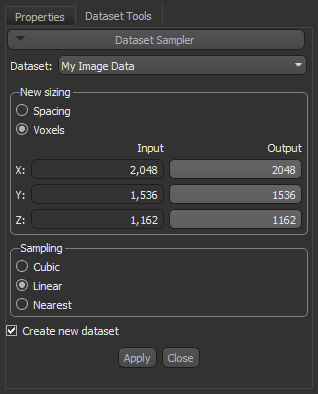
In the Dataset Sampler panel, shown below, you can modify the image spacing of slices within a volumetric dataset by upsampling (decreasing spacing or increasing the number of voxels) or by downsampling (increasing spacing or decreasing the number of voxels). You should note that although sampling reduces or increases the resolution of 3D datasets, the size of the original volume is always maintained.
Dataset Sampler panel
|
|
Description |
|---|---|
|
New sizing |
Determines the spacing between image slices or the number of image slices that will be removed or created by interpolation. Interpolation schemes for sampling are selectable in the Sampling box. Spacing… The selected Output values determine the spacing between image slices along each axis in the output dataset. Increasing the spacing along any axis will reduce the number of image slices within the corresponding plane by downsampling. Decreasing the spacing along any axis will increase the number of image slices within the corresponding plane by upsampling. Voxels… The selected Output values determine the number of image slices along each axis that will be present in the output dataset. Increasing the number of voxels will decrease the spacing between image slices in the dataset, while decreasing the number of voxels will increase the spacing between image slices. |
|
Sampling |
Determines the type of interpolation — Nearest, Linear, or Cubic — that will be applied to the dataset if it is sampled. Nearest… This basic interpolation scheme requires the least processing time because it only considers one pixel — the one closest to the interpolated point. You should note that the Nearest algorithm may cause resampled images to be shifted with regard to the original by the difference between the positions of the coordinate locations. This means that the Nearest algorithm cannot be used when it is necessary to preserve sub-pixel image relations. Linear… This interpolation scheme considers the closest 2x2 neighborhood of known pixel values surrounding the unknown pixel. It then takes a weighted average of these 4 pixels to arrive at its final interpolated value. Linear interpolation amounts to convolution of the sampled image by a triangle function and can result in much smoother looking images than Nearest. Cubic… This interpolation scheme goes one step beyond linear by considering the closest 4x4 neighborhood of known pixels — for a total of 16 pixels. Since these are at various distances from the unknown pixel, closer pixels are given a higher weighting in the calculation. Cubic interpolation can produce noticeably sharper images than the previous two methods, and is perhaps the ideal combination of processing time and output quality. This scheme can produce smoother results, but it has a higher computational cost. |
|
Create new dataset |
Transformations that involve sampling can be implemented by either one of two mechanisms — at the input so that the original image data is transformed, or at the output so that a new dataset is created and the original remains unmodified. |
 How to Sample a Dataset
- Right-click the required dataset in the top section of the Data Properties and Settings panel and then choose Sample Dataset in the pop-up menu.
The Dataset Sampler panel appears on the Dataset Tools tab.
- Select a new sizing for the dataset by entering output values for Spacing or Voxels in the New sizing box.
- Select a Sampling option — Cubic, Linear, or Nearest.
- Check the Create new dataset option, if required. If checked, a new dataset will be created with the selected changes.
- Click the Apply button.